Monthly Archives: August 2014

Which ‘new’ console would I recommend

So I get asked reasonably often which of the ‘new’ generation consoles I would recommend.  My recommendation would be ‘all of them’, but if you can only afford one then here are some of my thoughts.

First off, they all play games, which is good.  There are currently very few ‘must have’ exclusives on PS4 and Xbox One, with most the AAA games available on both.  The Wii U has some awesome games, but only a few of them.

Xbox One Pros

  • Has my favourite interface of the bunch, which is intuitive and easy to navigate
  • The controller is in my opinion the best of the lot (probably the best standard controller ever made)
  • The rumble triggers on the controller are cool
  • I can tell my Xbox to turn off, and as of this week to also turn on (update came out this week for Australia)
  • Is as quite as a mute mouse
  • Can now play video off USB
  • Has Achievements (Gamer Points)
  • HDMI pass through (My second Wii U goes through the Xbox, with no perceptible lag)
  • I like talking to my Xbox, even though I could use a controller
  • The camera on the Kinect is really quite amazing, it’s great for Skype

Xbox One Cons

  • Installing new games has sucked in the past, as they need to fully install to the hard drive, and then sometimes download and install a mandatory patch.  This can take hours depending on your bandwidth and this size of the update.  Some games I’ve wacked in when I got home so that I can play them the following day.  Though funnily enough I could start play Diablo 3 not longer after I started installing it.
  • Indie game choice is currently quite small (compared to PS4)
  • No ‘handheld’ companion device (I’m not counting Smart Glass)
  • They are now bundling without the Kinect, so I expect the Kinect support to diminish, which is a shame
  • It’s can’t stand on it’s side and is bulky (but does look pretty cool)

PS4 Pros

  • Great selection of indie games
  • PS Plus is awesome, good selection of ‘free’ games every month
  • Cross Buy/Cross Play/Cross Save with Vita
  • Remote Play with Vita
  • Arguably the most ‘grunt’ of the lot, however realistically I don’t think the average gamer would notice any difference between games that have been released on both the Xbox One and PS4.
  • Use Remote Play on a different TV with PlayStation TV (out in November), so can play PS4 on a different TV
  • Has achievements (Trophies, I like them better than Gamer Points)
  • Can lay flat or stand on side

PS4 Cons

  • On/Off and Eject buttons are tiny and easy to hit the wrong one
  • Is too noisy (compared to my PS3 Slim, Xbox Slim and first Wii U, which all sit together)
  • No ability to re-arrange the interface, can be hard to find games
  • No DNLA (yet), which was a cool feature of the PS3

Wii U Pros

  • Ability to play a lot of games purely on the Game Pad
  • Mario games, currently Super Mario 3D World and Mario Kart 8 are almost worth buying the console for
  • Not very power hungry for those who are power conscious
  • Very quiet (not as quiet as Xbox One, but close)
  • Backwards compatible with Wii games
  • Virtual Console for playing older Nintendo games
  • Can lay flat or on vertical on stand
  • Cheaper than the other consoles

Wii U Cons

  • Almost no support from the AAA third party publishers, thus most the cool games are the first party ones (which is not a bad thing, Nintendo make great games!)
  • Need to buy too many controllers that don’t come with it, especially if you don’t already own a Wii, e.g. Wii-motes, nun chucks, Wii U Pro Controller
  • Game/DLC purchases tied to console you buy them on
  • Comes with a very small amount of memory, 32GB with Pro, 8GB with standard, though easily upgradable (it’s only a SD card)
  • Not as much ‘grunt’ as the Xbox One or PS4
  • No trophies/achievements

My summary would be:

  • If you have young kids and already have a Wii, then there are some great kid friendly games on the Wii U (not to say that they are just for kids, but that kids can also play them!), making the Wii U a good cheap(er) option.  Be aware though that the current game pool is very limited.
  • For gaming in general, between the Xbox One and PS4 at this stage I would lean towards the PS4, especially if you already have and use a PS Vita.  If you have and use a PS Vita then the PS4 is the only sensible choice.
  • I think at this stage the Xbox One makes a better media hub and has a better controller, but the combination of cool indie games, great first party titles in the works, PS Plus (which you definitely should pay for), and the cross buy/cross play/cross save features with PS Vita, make the PS4 the console to go for at this time.

 

Games I’ve been playing recently

So this is my list of some of my recent gaming adventures:

  • Plants vs Zombies: Garden Warfare (XB1) – Don’t know why people bitch about needing Xbox Live Gold membership to play this, just pay your $40-$50 for 12 months, get some free games every month and stop bitching
  • Limbo (Vita) – My silhouetted  little friend died violently over and over again, but he kept pushing through, Vita is a great platform to play it on
  • Adventure 1 & 2 (Atari 2600) – Dam that bat is mean, my boys found this game hilarious, especially when the bat stole my lance, I got eaten by a dragon, then the bat dropped the lance and started carrying the said same dragon around (with me in visible in it’s transparent belly)

  • NES Remix 2 (Wii U) – Proves to me how bad I am/was at playing some of the classics, still a lot of fun though
  • Metroid (3DS Virtual Console) – Was enjoying myself, but there is no way I’m writing down a stupidly long password to enter for when I die and need to restart
  • Rayman Origins (Vita) – Both Origins and Legends are awesome games, another one I need to add to the couch co-op with kids list (Not for the Vita though, four player on the hand-held would be a little challenging)
  • Mario Kart 8 (Wii U) – Awesome game
  • Rouge Legacy (Vita) – Another awesome game, I love the whole cross-buy/cross-save thing, that’s awesome

Donkey Kong 2 times 2

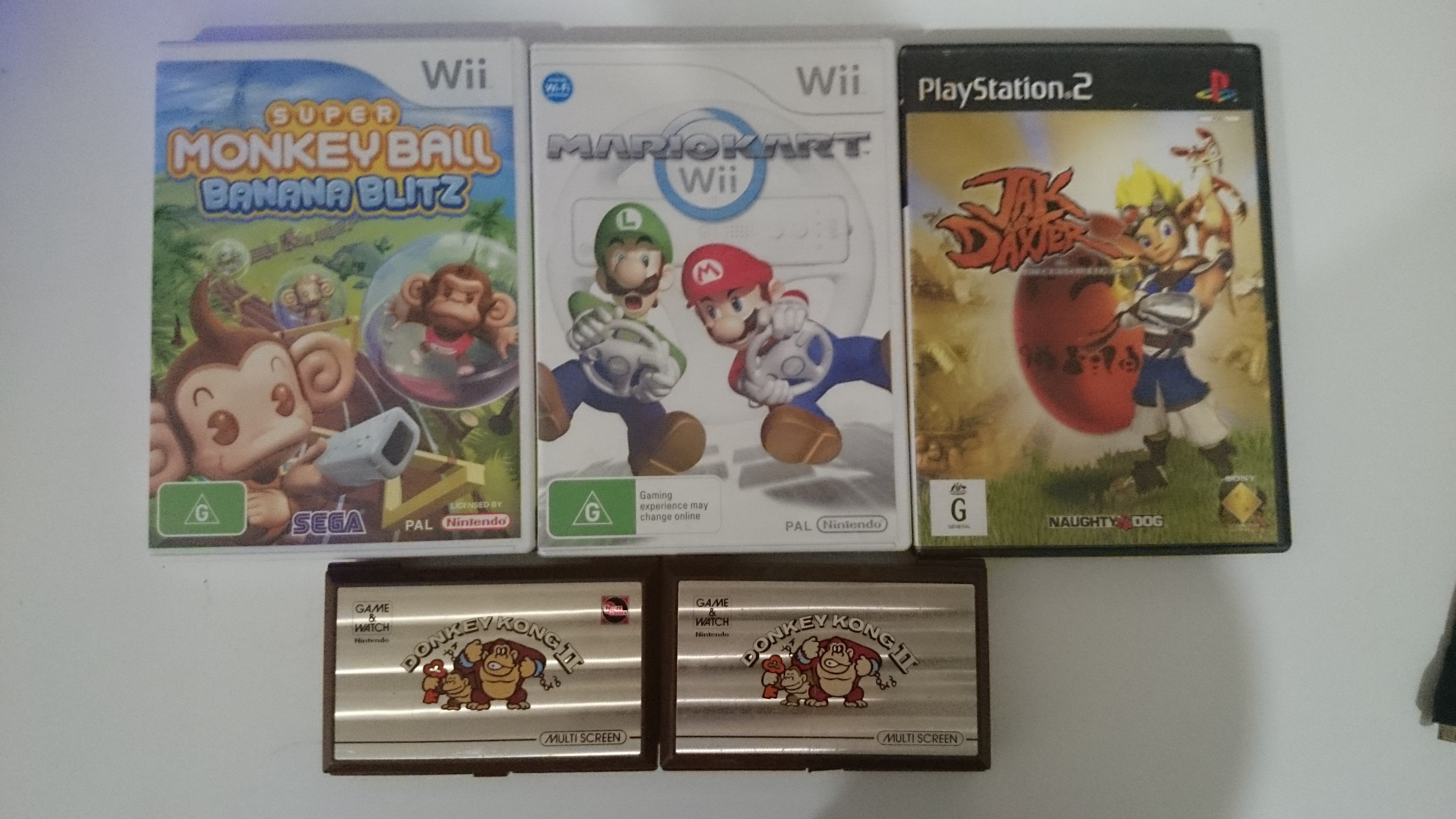
Not a bad haul from the markets today.  Key finds were two Donkey Kong II Game and Watches (one with battery cover) for $70, and Mark Kart Wii (which my copy went missing) for $2.

I put one of the DK IIs up on e-bay, and I’ve already had an offer of $80 (I’ve got it up for $95).  So with I should actually end up with more cash than I spent and 4 games added to the stash!

DSC_0134

Almost any Game & Watch in good condition sells well, but ones with key Mario characters such as DK or Mario sell extremely well.

Steam In-Home Streaming

So I tested Steam’s streaming capability recently, and it’s not too bad, but still has some issues.

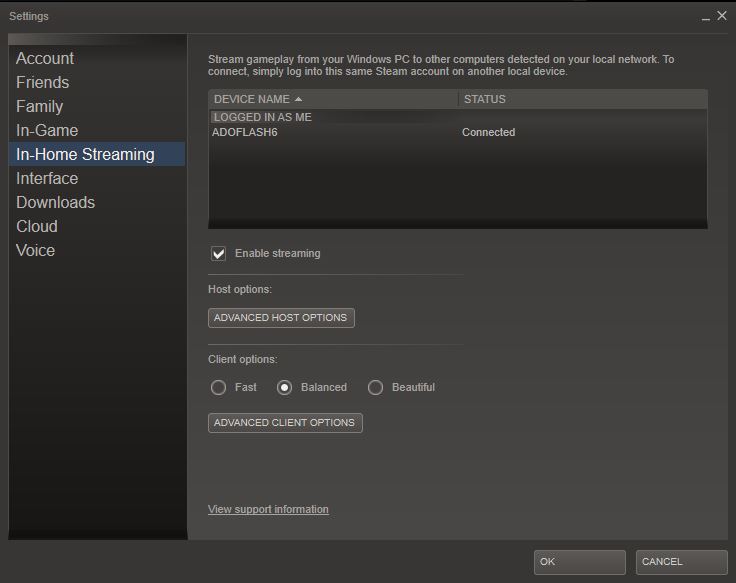
The setup is easy, as there isn’t any, it’s enabled by default.  Though if you want to you can configure in-home streaming  from the Steam Settings page.


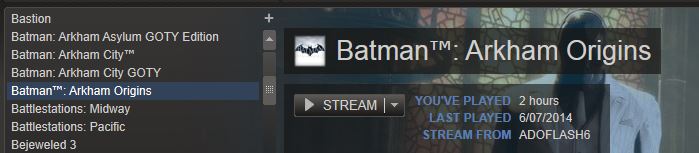
SteamStreaming-OptionsScreenAll you need to do is to log on to steam on to a second PC on the same local area network (wireless or wired, though better results with wired).  On the second PC select the game you want to stream from the ‘source’ PC and select ‘Stream’ (If you already have the game installed on the second PC there will be a drop down option next to the ‘Play’ button).  The game will start on the source PC and stream the graphics and audio to the second PC, taking input from the second PC.

SteamOptionToStream

Couple of things to be aware off:

  • The game will start in the resolution that has been configured on the source PC and scale to meet the resolution of the destination PC.  I started Batman Arkham City, and was greeted with a thin strip across the middle of the monitor I was streaming to, as I had the game configured for a resolution of 5760 x 1080 on my source PC
  • Sound only comes through in stereo to the second PC
  • Sound is not bi-directional, i.e. you can not use native voice chat inside games (you can use other voice communication software)
  • You can’t start streaming a game if the source PC is locked
  • The game is actually displaying on the source PC, you may want to turn off the monitors and sound on the source PC if you don’t want to annoy anyone nearby (this also means you can’t use your source PC when you are using in-home streaming)

I did find it a little buggy to begin with, but it seems with each Steam update recently it has become a little more stable.

Call of Duty: Ghosts Single Player – An interactive movie experience

Finished playing through the single player campaign of Cal of Duty: Ghosts last night, disappointed that there were no actual ghosts.  While I enjoyed the single player, I did feel that I was more along for the ride than any essential part of the team.  During most parts of the game if you stay low, do as you are told, and don’t put yourself in front of bullet storm your teammates will do the majority of the work for you.  The game is pretty sure that you are a bit slow and can’t work out what you need to do on your own at any one second, and will be constantly told to move forward, take cover, plant explosives here, take out the guy on the right etc.    The single player campaign will definitely not intellectually challenge you, but the graphics and production are detailed, smooth and buttery, the set-pieces amazing, the missions varied and the gun-play very satisfying.  I actually looked forward to each loading screen, which has a very cool graphical way of representing what is being communicated to you about the story and your next mission. 

An amazing amount of people worked on this game, watching the credits I counted at least 35 Davids, which I presume where not injured in the making of this game.

In all, I would say the single-player campaign justifies the cost of the game, however CoD is really focused on multi-player.  Now I’m not into multiplayer FPS’s, as

  1. I like games, but I’m not particular good at them
  2. I don’t have the time to get good
  3. I don’t like being abused by 12 year olds

If you are into the multiplayer experience, then the single player campaign is a nice 5-7 hour addition to the package, if you are not, then I would wait until the game is on the cheap if you just want the single player experience.

Dungeons & Dragons: Chronicles of Mystara

Dungeons & Dragons: Chronicles of Mystara (Xbox 360 Live Arcade) – This is a compilation of two arcade games from the mid-nineties, Tower of Doom and Shadow of Mystara, and it looks, sounds and plays like an arcade game from the mid-nineties, which is not a bad thing at all.  It’s sort of a Golden Axe on steroids, with heaps of characters, loot, levels to be levelled and (grind) achievements to be had.

I played through to completion which took about two hours, and if I was whacking dollars coins into the arcade version, would have cost me $48.  I’m sure if you were practiced and skilled, which I am not, it would have taken considerably less, but as the credits actually met nothing to me I just mashed the buttons as well as I could.  The actual cost to me was $5, as its on sale for the Xbox 360 at the moment.  The most annoying thing in the game is that the attack button is the same as the pick up button, so you find yourself surround by gnolls and other various beasties, go to take a swing and find yourself bending over to pick up some loot, outside of that it is a fun mindless affair.

This is a game that definitely be more fun with multiple players (up to 4) for a trip down arcade memory lane, and is available on PSN, XBLA, Wii U and Steam.  If you end up enjoying yourself with this one, then a good modern equivalent is Dragons Crown (if you can get over the comically large bouncing boobies).

So with one insolent screw standing between me and a (possibly) working virtual boy, I decided that the screw was not welcome and had to go  I enlisted (from the local hardware store) a very long drill bit, let’s call him Charles (no particular reason, seems good as any).  I wrapped Charles up in electrical tape as to try and keep him centred in the hole will he tussled with the screw.

Unfortunately Charles could not stay on target, with bit’s of 20 year old Virtual Boy plastic flying everywhere. I also (accidentally) decided to see if the Virtual Boy would bounce .. which it did not.  I decided to take a different tact which was to get Charles to remove all the plastic around the screw, and after 20 minutes of not so gentle drilling and a lot of ‘oh hell what am I doing!’ Charles came up trumps and victory was ours!!

Removing the data ribbons was surprisingly easy, I pre-heated the oven to 180 degrees Celsius, and promptly left the house with the oven on.  Returning an hour later I re-read some posts and realised that ‘the internets’ were talking about 200 degrees in Fahrenheit, not Celsius, so I de-heated the oven down to 85 degrees C and put the ribbons into bake for 2 minutes. 

After removing them, pressing down on the now soft-glue an then giving them taping them down.  I reassembled the Virtual Boy, taking an educated guess which one was for the right eye, and which was for the left, and plugged it the controller (which is where you turn the thing on from), and to my complete and utter surprise SUCCESS, both eyes now worked perfectly!

I wacked in a few games and gave it a run:

  • Wario Land – A Mario like game which was surprisingly fun, knocked out 5-6 levels
  • Mario Tennis – Got my ass handed to me by Princess Peach, 0-6
  • Super Bomberman Tetris like game – The game and manual was all in Japanese .. which I don’t read, but I understand the language of rotating shapes to make arbitrary lines..

30 minutes of gaming with it was enough, staring at nothing but red lines does drive you a little crazy after awhile.  It now it sits proudly on my shelf as a working Virtual Boy.

When I’ve bought games for my boys, I’ve always looked to getting games that are appropriate(ish) and they can play on the same screen together (not against each other), and if I can join-in, all the better!  This is a list of some of the better ones, and the platform we play them on:

  • Little Big Planet and Little Big Planet 2 (PS3 – 4 players)
  • Skylanders SSA, Giants and Swap Force (PS3/PS4 – 2 players)
  • Ratchet and Clank All-4-One (PS3 – 4 players)
  • New Super Mario Bros U (Wii U – 4 players)
  • Super Mario 3D World (Wii U – 4 players)
  • All the Lego Games (PS3/PS4/XB1 – 2 players)
  • Mario Kart Double Dash (GameCube – 2 players)
  • Golden Axe (Megadrive – 2 players)
  • TMNT (SNES – 2 players)

I wouldn’t mind hearing about any others out there (on any platform!) that are couch co-op an appropriate for a 6 year old and 8 year old to play together.

Played through Thomas Was Alone on the weekend, to complete a game in one weekend is an achievement for me, even if it is only 2-3 hours in length.  A good puzzle platformer game, made a great game through the brilliant commentary by Danny Wallace.

The puzzles and platforming are simple yet rewarding.  Each of Thomas’s quadrilateral friends have different abilities and jumping capabilities, and the puzzles revolve around using these capabilities to get each of our quirky rectangular shaped friends through to the exit point that represents their shape.

Some favourites for me were James, who has a complete disregard for the Newtonian laws of physics and falls upwards, not downward, and Sarah a quirky little double-jumper.  But realistically it’s the narration that makes it fun.

er.

Retro game hunting at the markets and PS1 backwards compatibility

Went to the markets for a bit of retro game hunting this morning.  Thick ice on the windscreen and the car telling me it’s 1 degrees outside should have been a telling sign that it was not going to be a day to find some retro goodness!  The only thing a bought was a couple of PS1 games for $3 each.

I have a set rule to spend no more than $5 each for CD based games, and these fitted the bill.  As another general rule I don’t buy old driving games, but I’ve got some good memories of Gran Turismo 2, so for me that’s $3 well spent.  Though I’ve got a few I don’t have a PS1 plugged in, but I do have a couple of PS2s and PS3s set up so thanks to the PS2’s and PS3’s backwards compatibility with PS1 games so I’m all good. 

I lot of people don’t know that all PS3’s are backwards compatible with PS1 games (while only some models are backwards compatible with PS2s).  PS1 games are 100% emulated in software on all PS3 models, whereas PS2 games are emulated with either

  1. The PS2s Emotion Engine CPU and Graphics Synthesizer GPU chip for the Japanese/US launch version of the PS3, or
  2. With software emulation and Graphics Synthesizer GPU in later models (including the Australian 60GB model released in Australia) or finally,
  3. Not at all, which is the case for 99.9% of Australian PS3s out there

An Australian PS3 with PS2 backwards compatibility will gouge you around $300-450 on e-bay, whereas a PS2 console should set you back around $35-$50.